CWP Introduces a New Era of Web Hosting Management: Discover CWP Edge, and Features Like CWP Cage and Secure Kernel
The world of Linux server management is constantly evolving, and Control Web Panel (CWP), formerly known as CentOS Web Panel, is taking an important step forward with its latest generation of updates and new technologies. With the introduction of the new CWP Edge update channel, a redesigned control panel experience, advanced account isolation, and improvements to server security, CWP is expanding its capabilities for hosting providers, system administrators, and web hosting businesses.
One of the most interesting developments is the introduction of CWP Edge 2.x, a new release channel designed to deliver innovative features earlier than the traditional Long-Term Support (LTS) branch. Combined with CWPpro, the new CWP Cage resource management system, and the redesigned CWP Secure Kernel, these developments represent a significant evolution of the platform.
Whether you operate a small hosting business, manage multiple websites, or run a server hosting hundreds of customer accounts, the latest CWP developments offer several interesting possibilities worth exploring.
Introducing the New CWP Version and the Edge Update Channel
One of the most significant changes in the CWP development strategy is the introduction of two separate update channels: LTS and Edge.
Previously, CWP users primarily followed the traditional release cycle, receiving new functionality and improvements through regular updates. The new approach introduces a clearer distinction between stability-focused releases and releases that deliver new features earlier.
The two channels serve different purposes.
CWP LTS (Long-Term Support) is designed for production environments where reliability and predictable operation are priorities. It receives tested improvements, bug fixes, security updates, and maintenance releases.
CWP Edge is designed for users who want to access the latest CWP technologies and features as soon as they become available. It provides an environment where new functionality can be introduced and improved before eventually becoming part of a future stable LTS release.
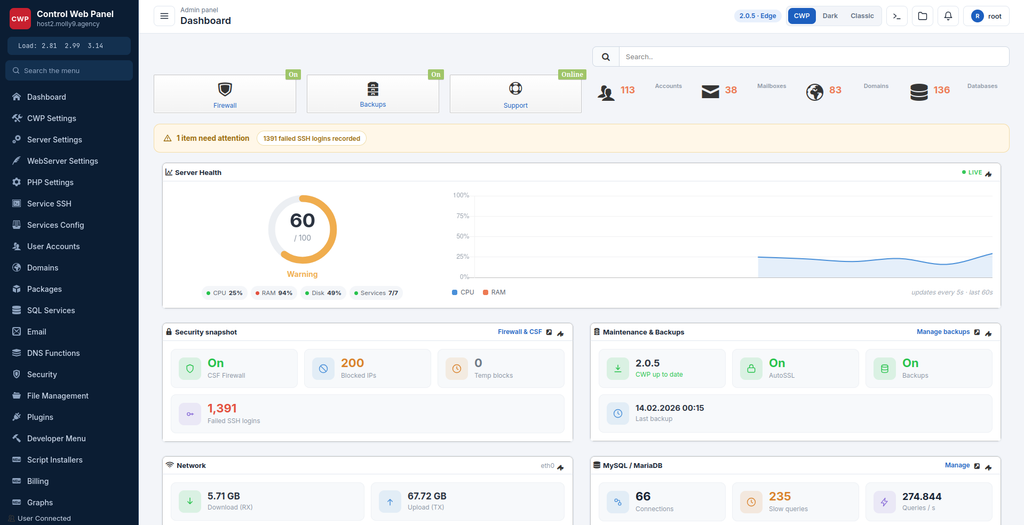
As of November 13, 2026, the latest published releases are CWP 1.30.11 for the LTS channel and CWP Edge 2.0.5.
Importantly, Edge is not a completely separate control panel. It includes fixes from the corresponding LTS releases while introducing additional functionality through the newer development branch.
Existing servers can switch to the Edge channel through the CWP update settings, while new installations continue to use the LTS channel by default.
This approach gives server administrators more flexibility when deciding how quickly they want to adopt new technologies.
CWP Edge 2.x: A New Generation of Hosting Control Panel Features
The CWP Edge 2.x development branch introduces more than a collection of minor improvements. It represents a broader modernization of the platform, with particular attention to hosting account isolation, PHP execution, resource management, usability, and server security.
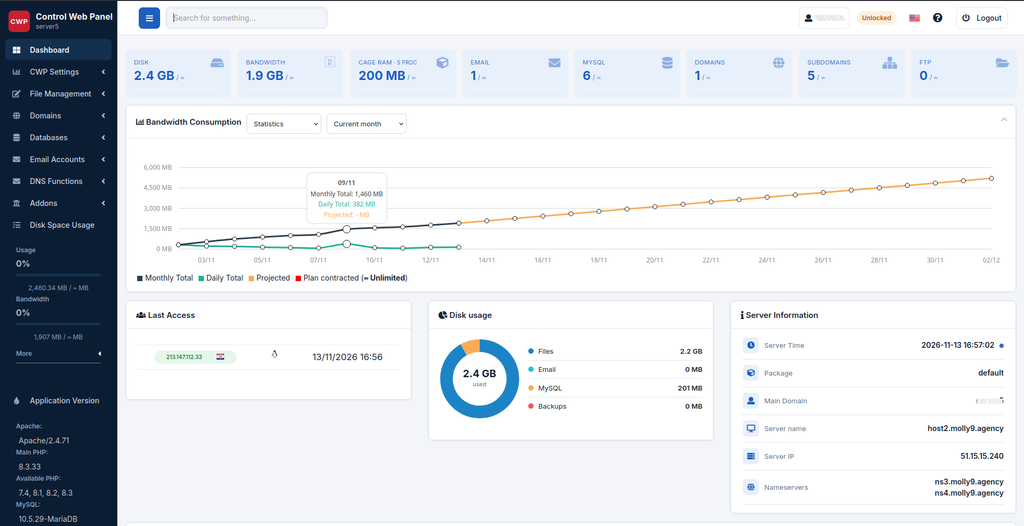
One of the first visible changes is the refreshed administrative interface.
The updated interface introduces a cleaner visual structure, improved navigation, more consistent design elements, and a modernized presentation of administrative functions. The intention is to make everyday server administration more convenient, especially for administrators who manage many hosting accounts.
The updated panel also introduces improvements to the underlying interface delivery, helping reduce unnecessary data transfer and making the administrative experience lighter.
However, the most interesting developments are not necessarily visual.
CWP Edge introduces new technologies that address some of the traditional challenges associated with shared web hosting, particularly resource consumption and account isolation.
Improved PHP Management and the New LSAPI Handler
PHP performance and resource consumption are important considerations for every hosting provider.
CWP Edge introduces a dedicated CWP LSAPI PHP handler, known as cwpsapi, offering an alternative to traditional PHP-FPM execution.
This is particularly interesting for hosting providers looking for additional flexibility when selecting PHP execution methods.
The newer implementation also integrates LSCache full-page caching capabilities. This provides an opportunity to improve website performance by serving cached content rather than generating every page dynamically.
The Edge development branch also introduces per-domain PHP handler selection for eligible CWPpro accounts. Administrators can select the lsPHP handler alongside existing PHP execution options, including Default, Selector CGI, and Selector FPM.
This means different websites can use different PHP execution methods according to their requirements.
For hosting providers, this creates additional possibilities for optimizing performance without necessarily changing the entire server configuration.
CWPpro and the Introduction of CWP Cage
Perhaps one of the most important developments for professional hosting providers is CWP Cage.
With CWPpro, CWP introduces a new approach to hosting account isolation and resource management designed to address a familiar problem in shared hosting environments.
On a traditional shared hosting server, multiple customers share the same physical resources. Although each hosting account has its own user and filesystem permissions, resource consumption can still become a significant challenge.
For example, a single website experiencing a sudden traffic increase, an inefficient database query, or a resource-intensive background process can negatively affect the performance of other websites hosted on the same server.
This is where CWP Cage becomes particularly interesting.
What Is CWP Cage?
CWP Cage is a per-account isolation and resource management system designed to provide hosting providers with more control over individual hosting accounts.
Its architecture combines Linux cgroups, account isolation mechanisms, and the CWP LSAPI PHP handler.
The system introduces CloudLinux-style resource management capabilities, allowing administrators to define resource limits for individual hosting accounts.
The available resource controls include:
- CPU limits: Define how much CPU capacity an individual hosting account can consume.
- Memory limits: Set memory restrictions to prevent excessive resource consumption.
- Process limits: Control the number of processes an account can run.
- I/O limits: Restrict disk input/output activity to help manage storage performance.
- Per-account monitoring: View actual resource consumption and identify accounts using the most server resources.
One particularly useful feature is the ability to configure limits at the hosting package level.
This means administrators can define resource policies for a hosting package, automatically applying those limits to every account assigned to that package.
Individual accounts can also receive customized resource limits when necessary.
For example, a hosting provider could create several hosting packages:
- Starter Hosting with conservative CPU and memory limits.
- Business Hosting with higher resource allowances.
- Professional Hosting with more generous limits for demanding websites.
Instead of manually configuring every customer account, administrators can manage resource allocation through package-level settings.
CWP Cage also includes a live resource monitoring interface, making it easier to identify the busiest hosting accounts and investigate potential performance problems.
Why CWP Cage Matters for Shared Hosting Providers
Resource management is one of the biggest challenges in shared web hosting.
Without proper resource controls, a single poorly optimized website can consume excessive CPU, memory, or disk I/O resources.
CWP Cage provides hosting providers with additional tools to manage these situations.
It can help prevent individual accounts from consuming disproportionate server resources, improve resource allocation, and create a more predictable hosting environment.
Another important consideration is that CWP Cage is included as a CWPpro capability.
This makes the combination of CWP and CWPpro particularly interesting for hosting businesses looking for CloudLinux-style resource management without necessarily introducing an entirely separate commercial operating system.
It is important to remember that CWP Cage and CloudLinux are separate implementations. Their underlying technologies and available features are not identical, but they address similar hosting management challenges.
CWP Secure Kernel: An Additional Layer of Server Protection
Server security is another major area of development within the CWP ecosystem.
The redesigned CWP Secure Kernel introduces an improved approach to server protection, combining kernel-level security mechanisms with configurable service protection rules and administrative controls.
For hosting providers, security is not simply about installing a firewall or scanning websites for malware.
A properly secured hosting environment must also consider how individual services interact with the operating system, which resources they can access, and what actions they are allowed to perform.
CWP Secure Kernel is designed to address these requirements.
What Does CWP Secure Kernel Do?
CWP Secure Kernel provides an additional security layer by applying protection policies to system services and processes.
The redesigned management interface introduces several useful capabilities:
1. Service-level protection
Administrators can configure individual services using three operating modes:
- Protect
- Log only
- Off
The Protect mode applies the relevant security restrictions, while Log only allows administrators to monitor potential restrictions without actively enforcing them. Off disables the corresponding protection.
These settings are preserved across security rules updates.
2. Security health checks
The system includes health checks covering important areas such as security rules, services, SSH, and web server functionality.
This helps administrators identify potential problems before applying or modifying protection policies.
3. Safe Mode and automatic rollback
One of the most useful improvements is the ability to switch to Safe Mode with a single action.
CWP Secure Kernel also includes automatic health checks when applying or updating security rules. If a check fails, the system can fall back to Safe Mode.
This is particularly important on production servers where an incorrectly configured security rule could otherwise interfere with essential services.
4. Security event monitoring
Administrators can inspect denied operations on demand or capture security events during a selected period.
This approach avoids the need to run a permanent logging daemon solely for this purpose.
The interface also provides information about running processes and their protection status, helping administrators understand how security policies affect server operations.
5. Custom security rules
The redesigned interface provides searchable service rules, an option to allow specific denied operations, automatic rule updates, and support bundle generation.
This gives administrators more flexibility when investigating compatibility problems or adjusting protection policies.
Secure Kernel Updates and Automatic Recovery
Another interesting aspect of CWP Secure Kernel is its kernel update management.
The control panel can display both the currently running kernel and the kernel selected for the next boot.
Administrators can install updated Secure Kernel versions through scheduled nightly updates or manual installation.
The system also introduces a safer kernel activation process.
After a new kernel is started, CWP performs a health check covering security rules, services, SSH, and web functionality. If the checks succeed, the new kernel can be retained as the boot kernel.
If the verification fails, the server can automatically restart using the previous kernel.
This is an important improvement because kernel-level security changes must be introduced carefully, particularly on remote production servers where losing SSH or web access can create serious administrative problems.
CWP Secure Kernel therefore provides more than basic kernel installation. It combines protection management, rule administration, health verification, and recovery mechanisms into a single management environment.
Additional Improvements in the Latest CWP Releases
Apart from CWP Cage, the LSAPI handler, and Secure Kernel, recent releases also introduce several improvements worth mentioning.
Better Migration and Backup Security
Recent CWP updates have introduced additional validation and input handling throughout backup restoration and server migration processes.
This includes stricter validation of account names, domains, paths, FTP information, and data imported from external hosting panels.
These improvements are particularly important because backup archives and migration packages can contain data originating from external systems.
Careful validation helps prevent malformed or manipulated archive contents from affecting unrelated server resources.
Improved Update Security
CWP has also improved the security of its update mechanisms.
Recent releases have moved important version checks and MySQL upgrade downloads to HTTPS, reducing the risk of interception or manipulation during these operations.
The platform has also introduced an Ebury cleanup utility and a corresponding Security Audit check designed to detect and quarantine a tampered libkeyutils library associated with the Ebury SSH credential-stealing threat.
Improved PHP and Web Hosting Compatibility
The latest releases also include PHP-related fixes, improved PHP-FPM handling, and additional compatibility improvements.
The introduction of per-domain LSAPI selection provides more flexibility, while the newer PHP execution handler offers another option for hosting providers interested in performance optimization.
CWP continues to support established web server technologies and multiple PHP versions, making it suitable for hosting environments running different types of websites and applications.
CWP Edge vs. CWP LTS: Which Version Should You Choose?
With two update channels available, administrators need to consider which one best fits their hosting environment.
Both channels have their advantages.
CWP LTS is recommended for:
- Production hosting servers.
- Hosting providers prioritizing predictable operation.
- Servers running important business websites.
- Administrators who prefer tested releases.
- Environments where introducing new features immediately is unnecessary.
CWP Edge is interesting for:
- Administrators who want to explore new CWP functionality.
- Hosting providers interested in CWP Cage.
- Users who want to test new PHP execution technologies.
- Server administrators interested in the latest security improvements.
- Hosting businesses preparing to introduce new services and resource management options.
It is important to understand that Edge is an opt-in release channel, not the default installation option.
Administrators should evaluate the compatibility of their applications, server configuration, PHP handlers, and installed extensions before switching production environments to Edge.
For critical hosting infrastructure, testing the new release channel on a separate server before deployment is a sensible approach.
Is CWPpro Becoming an Interesting Alternative for Professional Hosting Businesses?
The combination of CWPpro, CWP Cage, and CWP Secure Kernel makes the platform particularly interesting for professional hosting providers.
Traditionally, hosting companies have often relied on multiple products to provide server management, account isolation, resource limits, and security enforcement.
The latest CWP developments demonstrate an effort to bring more of these capabilities directly into the CWP ecosystem.
CWP Cage introduces per-account resource controls, while Secure Kernel provides additional operating system and service protection.
The new LSAPI handler adds another PHP execution option, with integrated LSCache functionality.
Together, these technologies create an increasingly comprehensive environment for managing shared hosting servers.
For smaller hosting providers, this is particularly relevant because managing multiple commercial software licenses and separate security products can increase operational complexity and costs.
CWPpro provides an opportunity to access additional professional hosting capabilities within the CWP ecosystem.
However, server administrators should always evaluate licensing requirements, hardware resources, compatibility, and the specific features they need before selecting a hosting platform.
Final Thoughts: CWP Is Moving Towards a More Complete Hosting Platform
The introduction of CWP Edge marks an important development in the evolution of Control Web Panel.
Instead of relying exclusively on traditional stable releases, CWP now provides a separate development channel where new technologies can reach administrators earlier.
The latest Edge releases introduce several particularly interesting developments, including CWP Cage, the CWP LSAPI PHP handler, integrated LSCache functionality, and improvements to account isolation.
At the same time, the redesigned CWP Secure Kernel demonstrates a stronger focus on server protection, security policy management, health checks, and automatic recovery.
For hosting providers, the combination of CWPpro and these new technologies offers interesting opportunities to improve resource management, website performance, and server security.
CWP is clearly expanding beyond the role of a traditional Linux hosting control panel. With its new development strategy and growing collection of integrated technologies, it is positioning itself as a more comprehensive platform for modern web hosting operations.
For administrators already using CWP, the new Edge channel is certainly worth exploring, especially if account isolation, resource management, and improved PHP performance are important parts of their hosting strategy.


0 thoughts on “CWP Introduces a New Era of Web Hosting Management: Discover CWP Edge, and Features Like CWP Cage and Secure Kernel”